
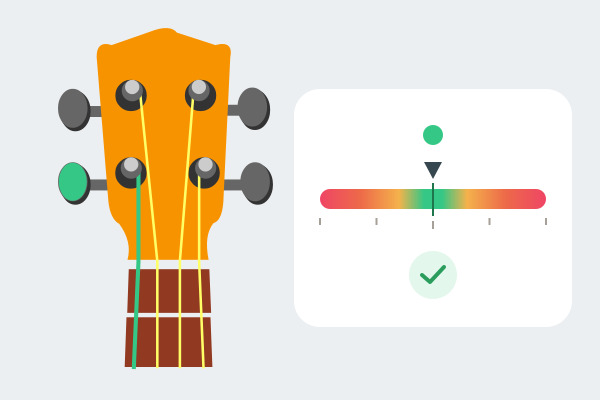
Tune all four strings using the microphone and follow the arrow to adjust their tension. Runs in your browser with no installation.
Tuning and requirements
Standard high-G tuning: G4–C4–E4–A4, from left to right in the drawing. Fixed reference: A = 440 Hz. Not configured for low G or baritone ukulele.
You need a microphone and a browser that allows access to it. Open the app using HTTPS or localhost and grant access.
Getting started
- Click “Enable microphone” and grant permission.
- In Manual, select the note, string or tuning peg. In Automatic, play a string and the closest one will be selected.
- Play the open string without pressing a fret, and mute the others.
- Adjust the peg gradually and pluck again until the arrow is centred in green.
- Repeat for all four strings and click “Stop listening” when finished.
Reading the indicator
- Left / Tighten: the note is flat; increase tension.
- Right / Loosen: the note is sharp; decrease tension.
- Green: in tune, within ±5 cents.
Hz shows the detected frequency; cents shows the deviation from the target note. One semitone equals 100 cents. The arrow stops at ±50; the number also shows larger deviations.
Options
Locks your chosen string. Use it when the string is very out of tune or Automatic selects another. Clicking a string or peg returns to Manual.
Selects the nearest frequency. Play one string at a time; it cannot know your intention if the pitch is closer to another note.
Changes the note names without changing the tuning or stopping listening.
Practical tips
- Find a quiet place and move the ukulele closer to the microphone if the reading is weak.
- Pluck gently and wait for a stable reading; avoid strumming several strings.
- Turn the peg in small steps. Follow Tighten / Loosen rather than assuming every peg turns in the same direction.
- Check all four strings again when finished: adjusting one can affect the others.
Troubleshooting
- Permission denied: allow microphone access in your browser settings and enable it again.
- No reading: check the microphone, mute the other strings and move the instrument closer.
- Wrong string: switch to Manual and select the string you are playing.
Sound is analysed on your device; it is not recorded or uploaded. Listening stops when you hide or leave the page.