
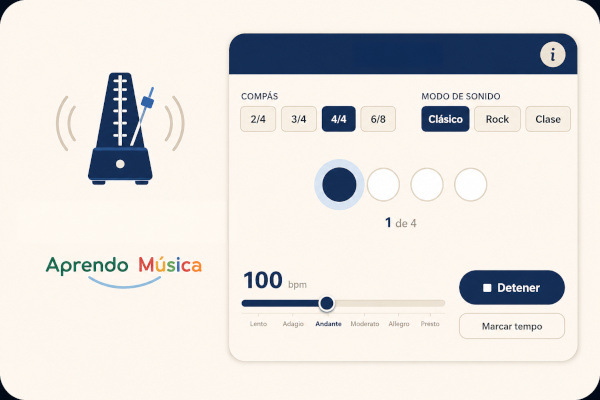
A metronome that is more than a click: it shows the pulse with a row of lights — one for each beat of the bar — so you can see, not just hear, where the strong beat falls and how the weak beats are grouped. Useful for practising alone, rehearsing in a group or projecting in class.
What is this metronome
The row of lights is what sets it apart from a pocket metronome or a generic app: in a compound time signature such as 6/8, the lights are grouped in two blocks of three, showing at a glance why that time signature "feels" different from 3/4 even though both have six eighth notes.
It works both for practising alone — setting the tempo of a piece, keeping the pulse in a technical exercise — and for projecting on a big screen during a class.
How it works
- Choose the time signature (2/4, 3/4, 4/4 or 6/8) and the tempo with the slider — the bpm number and the musical term (Slow, Adagio, Andante…) update together.
- Choose the sound mode: Classic, Rock or Classroom.
- Press Play. The row of lights lights up beat by beat — the orange light marks the strong beat, the purple ones the weak beats — while the pulse sounds.
- Time signature and sound mode can be changed at any time, even while the metronome is running.
- Don't know the exact tempo of a song? Press Tap tempo to the beat of the song a few times in a row — the metronome works out the bpm for you.
Settings
2/4, 3/4 and 4/4 (simple time) and 6/8 (compound time). In 6/8 the row of lights groups the six beats into two blocks of three, with a secondary accent on the second group — the same real grouping as in the score, not just a counter.
A slider from 40 to 208 bpm. The exact number is shown above it; below, the matching Italian term (Slow, Adagio, Andante, Moderato, Allegro, Presto).
Classic: the traditional click, higher on the strong beat. Rock: bass drum on the strong beat, snare on the weak ones. Classroom: tambourine and wood block — the usual classroom percussion.
Tap the button to the beat of a real song (at least two taps, up to five for more accuracy) and the metronome sets the bpm automatically.
For the classroom
Pulse warm-up: at the start of the class, switch the metronome on at a comfortable tempo (Andante, 76-90 bpm) and ask the group to mark the pulse with claps or with their feet before singing or playing anything.
See the time signature, not just hear it: when introducing a new time signature — especially 6/8 — switch the lights on and ask the group to describe what they see before explaining it. The 3+3 grouping is easier to understand when seen than when described.
Instrumental rehearsal with a pulse reference: while the group plays recorder or classroom percussion, leave the metronome in Classroom mode (tambourine and wood block) so as not to introduce a foreign timbre.
Raise the tempo: with a rhythmic ostinato the group already knows, raise the tempo a few bpm each time they play it well, until they start to lose sync — an objective measure of how far the group can go today.
Set the real tempo of a song: before working on it, use Tap tempo by tapping its pulse by hand for a couple of bars. The resulting bpm is then fixed for the rest of the rehearsal, instead of going "by ear".
Recommended level
Useful from the first years of primary school, as soon as the notion of pulse is worked on, up to secondary school and instrumental or school-band groups, where it serves as a tempo reference during rehearsal. Classroom mode suits the usual classroom percussion in primary especially well; Rock mode is closer to the secondary repertoire or to individual study with modern instruments.
More classroom resources
This metronome can also be projected on an interactive whiteboard, alongside the rest of the collective classroom resources for music — wall chime and rhythm dictation.